Strike Brushes for Illustrator: Realistic Vector Art Brushes for Creative Projects
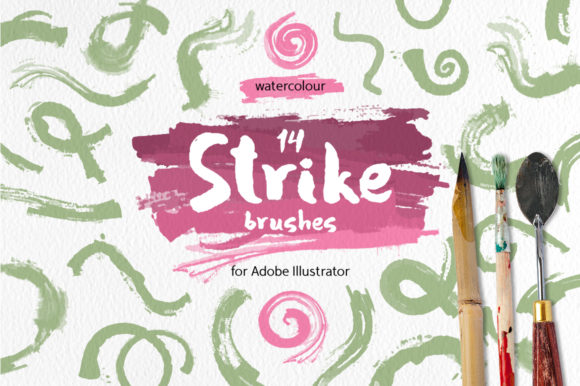
For designers, artists, and creators looking to add a touch of natural artistry to their digital work, Strike Brushes for Illustrator offers a unique solution. These vector-based art brushes are inspired by real hand-painted watercolor strokes, providing an authentic and detailed look that can enhance a wide range of design projects. Whether you're working on web banners, backgrounds, or abstract compositions, these brushes bring a level of realism that is both versatile and easy to use.
What Are Strike Brushes for Illustrator?
Strike Brushes for Illustrator is a set of 14 vector art brushes designed specifically for Adobe Illustrator. Each brush mimics the texture and flow of actual watercolor strokes, capturing the subtle variations in pressure and movement that make hand-painted art so expressive. Unlike traditional raster brushes, these are created as vector elements, which means they maintain crisp edges and clarity at any scale without losing quality.
The set includes four transparent gradations of each stroke color, allowing for dynamic visual effects while maintaining simplicity. Because they are vector-based, there’s no need for complex effects or blending modes, making them lightweight and easy to integrate into your workflow.
Key Features of Strike Brushes for Illustrator
- Realistic Watercolor Strokes: Each brush is based on actual hand-painted watercolor strokes, offering a natural and detailed appearance.
- Vector-Based Design: The brushes are created as vectors, ensuring scalability and compatibility with any background.
- Easy to Edit: Users can modify the brushes directly within Adobe Illustrator, adjusting colors, sizes, and shapes as needed.
- Multiple File Formats: The package includes AI, EPS, SVG, JPG, and PNG files, giving users flexibility in how they use and share the brushes.
- Compatibility: Designed for Adobe Illustrator 10 and higher, making them accessible to a wide range of users.
Where Can You Use Strike Brushes for Illustrator?
Strike Brushes for Illustrator are incredibly versatile and can be used across various design disciplines. Here are some common applications:
- Web Banners: Add a handcrafted feel to website headers, buttons, or promotional graphics without compromising resolution.
- Backgrounds: Create rich, textured backdrops for presentations, social media posts, or print materials.
- Art Pieces: Use the brushes to add organic textures to digital paintings, illustrations, or concept art.
- Abstractions: Experiment with patterns and forms to create unique, artistic compositions.
- Print Design: Incorporate realistic brush strokes into logos, packaging, or other printed materials for a professional finish.
Whether you're a graphic designer, a digital artist, or a business owner looking to elevate your brand visuals, Strike Brushes for Illustrator can help you achieve a more authentic and creative look.
Who Benefits from Using Strike Brushes for Illustrator?
Strike Brushes for Illustrator is ideal for a variety of users, including:
- Graphic Designers: Those who want to add a hand-painted aesthetic to their designs without the hassle of manual painting.
- Illustrators: Artists looking to incorporate natural textures into their digital artwork for a more organic feel.
- Web Developers: Professionals seeking to enhance UI/UX elements with unique, scalable graphics.
- Business Owners: Entrepreneurs who want to create visually appealing marketing materials with a personal touch.
- Students and Hobbyists: Individuals exploring digital art and looking for tools that offer both creativity and ease of use.
These brushes are especially useful for those who want to streamline their workflow while still achieving high-quality results.
Strengths and Practical Considerations
One of the main strengths of Strike Brushes for Illustrator is their versatility. Because they are vector-based, they can be resized without losing quality, making them suitable for both small and large-scale projects. Additionally, the lack of effects or blending modes ensures that the brushes remain simple and efficient to use.
However, it's important to note that while these brushes provide a realistic look, they may not replicate every detail of a hand-painted piece. For example, the variation in texture and depth might not match the complexity of a true watercolor painting. That said, they offer a practical alternative that balances authenticity with usability.
Another consideration is the learning curve associated with using art brushes in Adobe Illustrator. While the brushes themselves are straightforward, understanding how to apply and customize them effectively may require some time and practice. Fortunately, the included files make it easy to get started, and the editable nature of the brushes allows for experimentation and refinement.
Real-World Applications of Strike Brushes for Illustrator
Let’s explore a few scenarios where Strike Brushes for Illustrator can be particularly useful:
- Creating a Custom Logo: A designer might use the brushes to add a subtle, artistic border or background to a logo, giving it a more unique and handcrafted appearance.
- Designing Social Media Posts: A content creator could use the brushes to create eye-catching graphics for Instagram, Facebook, or Twitter, adding depth and visual interest to their posts.
- Developing a Website Layout: A web developer might incorporate the brushes into a site’s header or footer, enhancing the overall aesthetic without affecting performance.
- Producing Print Materials: A marketing team could use the brushes to design brochures, flyers, or posters with a professional yet artistic edge.
In each case, Strike Brushes for Illustrator provides a reliable and effective way to introduce natural textures into digital designs.
How to Evaluate if Strike Brushes for Illustrator Is Right for You
Before purchasing or using Strike Brushes for Illustrator, consider the following factors:
- Project Requirements: Determine whether your design needs a realistic, hand-painted effect or if simpler tools would suffice.
- Software Compatibility: Ensure that your version of Adobe Illustrator supports the file formats included in the set.
- Technical Skills: Assess your familiarity with Adobe Illustrator and its brush tools to ensure you can make the most of the set.
- Time and Resources: Consider how much time you’re willing to invest in learning and customizing the brushes versus using pre-made assets.
If you're looking for a tool that combines realism with ease of use, Strike Brushes for Illustrator is worth exploring. Its combination of quality, versatility, and accessibility makes it a valuable addition to any creative toolkit.