Scribble Brushes for Illustrator: Enhancing Digital Art with Realistic Vector Strokes
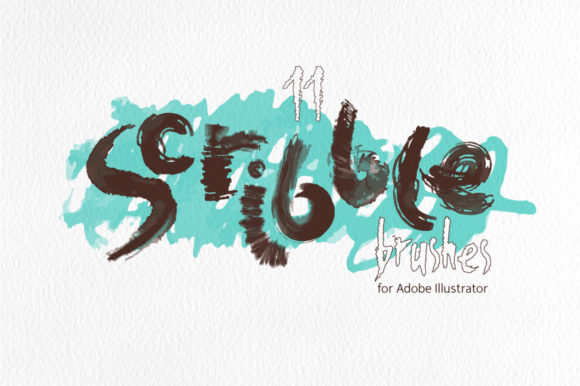
Scribble Brushes for Illustrator offer a unique set of 11 art brushes designed to bring the organic feel of hand-painted watercolor and ink scribbles into digital design workflows. These vector-based brushes are ideal for artists, designers, and creators looking to add natural texture and depth to their projects without relying on raster effects or complex blending modes.
Each brush in the collection is crafted from real-world scribbles, ensuring that every stroke carries a distinct character. This makes them particularly useful for creating backgrounds, web banners, abstract compositions, and other design elements that require a tactile, handmade aesthetic. Unlike traditional digital brushes, these vector brushes maintain crisp edges and clarity at any scale, making them versatile for both print and screen-based media.
The set includes multiple file formats, such as AI, EPS, SVG, JPG, and PNG, allowing users to integrate the brushes into various design environments. Whether you're working in Adobe Illustrator CS5 or a more recent version, these brushes are compatible and ready to use right out of the box. The inclusion of individual SVG files for each brush also provides flexibility for those who prefer to work with scalable vector graphics in different applications.
Key Characteristics of Scribble Brushes for Illustrator
One of the standout features of these brushes is their reliance on transparent gradations of a single stroke color. This approach eliminates the need for additional effects, ensuring that the brushes remain lightweight and easy to edit. Users can adjust the stroke width, color, and opacity without compromising the integrity of the original scribble, giving them full control over the final appearance.
The brushes are also designed to work seamlessly on any background. Whether your project has a solid color, gradient, or transparent area, the scribbles will adapt naturally without requiring extra adjustments. This versatility makes them suitable for a wide range of design scenarios, from minimalist web layouts to vibrant, layered illustrations.
Another notable characteristic is the ease of customization. Since the brushes are vector-based, they can be modified using standard Illustrator tools. You can tweak the shape, add or remove details, or combine multiple brushes to create custom textures. This level of flexibility empowers users to tailor the brushes to their specific needs, whether they're working on a personal project or a client's design brief.
Practical Applications and Use Cases
Scribble Brushes for Illustrator are highly adaptable and can be used across multiple creative disciplines. For instance, graphic designers often use them to add subtle texture to logos, icons, or UI elements. The natural variation in the brush strokes helps break up flat designs, adding visual interest and a sense of movement.
In the realm of web design, these brushes are perfect for creating engaging banners, headers, or background patterns. Their high-resolution JPG and PNG files ensure that they look sharp on all devices, while the vector versions allow for seamless scaling without loss of quality. This makes them an excellent choice for responsive design projects where consistency is key.
Artists and illustrators can leverage these brushes to enhance their digital paintings or illustrations. By layering different scribble styles, they can simulate the look of traditional media such as charcoal, ink, or watercolor. The brushes also serve as a great starting point for abstract compositions, where the randomness of the strokes can inspire new creative directions.
Educators and students may find these brushes useful for teaching design principles or exploring digital techniques. They provide a hands-on way to experiment with texture, line weight, and composition, helping learners understand how small variations in brush behavior can impact the overall visual outcome.
Advantages of Using Vector-Based Scribble Brushes
Vector-based brushes like those in the Scribble Brushes for Illustrator set offer several advantages over raster-based alternatives. One of the primary benefits is scalability. Unlike pixel-based images, which lose quality when resized, vector brushes maintain their sharpness and detail regardless of size. This is especially important for projects that require multiple output sizes, such as print materials or web assets.
Another advantage is the ability to edit the brushes without affecting their original form. Because they are made up of paths rather than pixels, users can adjust the stroke thickness, direction, or even rework the entire shape without degradation. This level of control is invaluable for refining designs and achieving precise results.
Additionally, vector brushes tend to be more efficient in terms of file size. Since they don't rely on complex effects or high-resolution images, they load faster and consume less memory, making them ideal for large-scale projects or collaborative workflows where performance is a concern.
Considerations for Potential Users
While Scribble Brushes for Illustrator are powerful tools, it's important to consider a few factors before incorporating them into your workflow. First, users should ensure that their version of Adobe Illustrator supports vector art brushes. The set is compatible with Illustrator 10 and higher, but older versions may require additional steps to access the full functionality.
It's also worth noting that while the brushes are designed to be user-friendly, they may require some experimentation to achieve the desired effect. Depending on the project, users might need to adjust settings such as stroke alignment, corner treatment, or brush spacing to get the best results.
Finally, the availability of multiple file formats means that users can choose the most appropriate option based on their specific needs. For example, the SVG files are ideal for web use, while the AI and EPS files are better suited for print or professional design work. Understanding the strengths of each format can help users make informed decisions about how to utilize the brushes effectively.
Overall, Scribble Brushes for Illustrator provide a valuable resource for anyone looking to add a touch of authenticity and creativity to their digital designs. With their realistic texture, ease of use, and compatibility across multiple platforms, they are a must-have tool for professionals and hobbyists alike.