Raggedy Art Brushes for Illustrator
If you're looking to add a unique, handcrafted feel to your digital artwork, Raggedy Art Brushes for Illustrator could be the perfect tool for you. These brushes are designed to mimic real hand-painted ink strokes, offering a level of authenticity that's hard to achieve with standard digital tools. Whether you're working on illustrations, web banners, or abstract designs, these brushes bring a natural and detailed look that can elevate your creative projects.
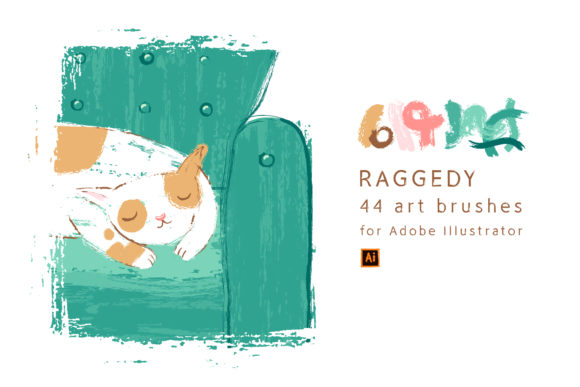
With 44 art brushes in total, this set provides a wide range of textures and styles to choose from. Each brush is crafted to offer a different effect, allowing you to experiment and find the perfect match for your design needs. The versatility of these brushes makes them suitable for a variety of applications, from simple line work to complex background elements.
One of the standout features of Raggedy Art Brushes for Illustrator is their compatibility. They work seamlessly with Adobe Illustrator versions 10 and higher, ensuring that you can use them regardless of which version of the software you're using. This makes them a great option for both seasoned designers and those just starting out in the world of vector art.
For users who prefer working with different file formats, the set includes multiple options. You'll receive a vector AI CS5 file, an EPS10 file, and an SVG file, all at 1000x1000px. Additionally, there are 44 individual SVG files, each containing a single brush. This means you can easily integrate the brushes into your workflow, whether you're using Adobe Illustrator or other design software that supports SVG format.
In terms of high-resolution assets, the set also includes a JPG file with clipping paths at 5000x5000px and a PNG file on a transparent background at the same size. These files are ideal for use in web design, print media, or any project that requires a high level of detail and clarity.
When it comes to practical use, these brushes shine in a variety of scenarios. For instance, if you're creating a website banner, the natural texture of the brushes can add depth and interest without overwhelming the design. Similarly, when working on a background for an illustration, the realistic strokes can help create a more dynamic and engaging visual.
Designers who work on branding materials may find these brushes particularly useful. The ability to add hand-painted elements to logos, icons, or other brand assets can give your work a more personal and authentic touch. This is especially valuable in industries where a unique aesthetic is key, such as fashion, publishing, or independent art.
Another area where these brushes excel is in the creation of abstract art. By layering different strokes and adjusting their sizes and positions, you can create intricate patterns and textures that stand out. This makes them a great resource for artists looking to push the boundaries of traditional design and explore new creative directions.
For those working on digital illustrations, the brushes can help add a sense of movement and energy to your compositions. Whether you're drawing characters, landscapes, or scenes, the organic nature of the strokes can make your work feel more alive and expressive. This is particularly beneficial for illustrators who want to maintain a consistent style across multiple projects.
It's also worth noting that these brushes are easy to edit and customize. If you need to adjust the thickness, spacing, or direction of a stroke, you can do so within Adobe Illustrator without any issues. This flexibility allows you to tailor the brushes to fit your specific design requirements, making them even more valuable in your creative toolkit.
Before using these brushes, it's important to consider how they will fit into your existing workflow. If you're used to working with more traditional digital brushes, you may need some time to get comfortable with the unique characteristics of these hand-painted strokes. However, once you become familiar with them, you'll likely find that they open up new possibilities for your designs.
Additionally, while the brushes are designed to work on any background, it's always a good idea to test them in different contexts to see how they perform. Some brushes may look better on light backgrounds, while others might stand out more on darker ones. Experimenting with different settings can help you achieve the best results for your specific project.
Overall, Raggedy Art Brushes for Illustrator offer a powerful combination of realism, versatility, and ease of use. Whether you're a professional designer, an aspiring artist, or someone looking to enhance your creative projects, these brushes can provide the tools you need to bring your ideas to life. With their wide range of applications and high-quality design, they're a valuable addition to any digital art collection.